
Mutability of Collections #
1. Core Concepts #
- Concept: In Swift, the mutability of collections (Arrays, Sets, Dictionaries) depends entirely on whether they are declared as variables (
var) or constants (let). This is unrelated to the collection’s type definition but is determined by the declaration method. - Key Syntax:
var(Mutable),let(Immutable) - Note:
Creating immutable collections is a good practice. It not only makes program logic clearer but also allows the Swift compiler to optimize performance for immutable collections.
2. Swift Example #
// If declared as var, the collection can be modified after creation (add, delete, change items)
var mutableArray = [1, 2, 3]
mutableArray.append(4)

// If declared as let, neither the size nor the content of the collection can be changed
let immutableArray = [1, 2, 3]
// immutableArray.append(4) // This line will report an errorLogic: This code demonstrates that var grants the ability to modify content, while let completely locks the collection’s content and length.
3. C# #
Concept Mapping: C#’s readonly keyword is fundamentally different from Swift’s let.
C# Example:
public class CollectionExample {
    // Even if it is readonly, the content of the List can still be modified
    public readonly List<int> numbers = new List<int> { 1, 2, 3 };

    public void Modify() {
        numbers.Add(4); // This is legal in C#! readonly only protects the reference from being reassigned
    }
}
Key Differences:
- Syntax: Swift’s
letdeclaration for collections means true “Deep Immutability”. - Behavior: This is because Swift collection types are Structs (Value Types), whereas C# collections are Classes (Reference Types). In Swift, assigning an Array to
letmeans the Value Type instance cannot be changed at all. In C#,readonly Listonly means you cannot point the variable to another List object, but the internal data can be modified. To achieve Swift’sleteffect in C#, one typically needs to useImmutableList<T>orReadOnlyCollection<T>.
Arrays #
1. Core Concepts #
- Concept: An Array is an ordered list that allows storing duplicate values. Swift’s Array is a generic collection.
- Key Syntax:
Array<Element>,[Element],[],.count,.isEmpty,.append(),+=,subscript[],[Range],.insert(),.remove(at:) - Note:
Swift’s Array type is bridged to Foundation’s NSArray class.
2. Swift Example #
// 1. Initialization and Literals
var someInts: [Int] = [] // Empty array
var threeDoubles = Array(repeating: 0.0, count: 3) // [0.0, 0.0, 0.0]
var shoppingList = ["Eggs", "Milk"] // Type inferred as [String]

// 2. Array concatenation and addition
var anotherThreeDoubles = Array(repeating: 2.5, count: 3)
var sixDoubles = threeDoubles + anotherThreeDoubles // Concatenate using +

shoppingList.append("Flour")
shoppingList += ["Baking Powder", "Chocolate Spread", "Cheese", "Butter"]

// 3. Access and powerful Range Subscript
var firstItem = shoppingList[0]
shoppingList[0] = "Six eggs"

// Replace 3 items at indices 4...6 with 2 items (changes total array length)
shoppingList[4...6] = ["Bananas", "Apples"]

// 4. Insertion and Removal
shoppingList.insert("Maple Syrup", at: 0)
let removedItem = shoppingList.remove(at: 0) // Returns the removed itemLogic:
Swift makes empty arrays and definitions very concise using []. Notably, the + and += operators make collection concatenation as intuitive as arithmetic. Additionally, Range Subscript allows developers to replace a specific range with a different number of elements, and the system handles array length resizing automatically.
3. C# #
Concept Mapping:
- Swift’s
[T]corresponds to C#’sList<T>. - Swift’s
Array(repeating:count:)is similar to C#’sEnumerable.Repeat().ToList(). - Swift’s array
[...]corresponds to C#’s Collection Initializer{...}.
C# Example:
// 1. Initialization and repeating default values
var someInts = new List<int>();
var threeDoubles = Enumerable.Repeat(0.0, 3).ToList();
var shoppingList = new List<string> { "Eggs", "Milk" };

// 2. List concatenation and addition
var anotherThreeDoubles = Enumerable.Repeat(2.5, 3).ToList(); // Added for comparison
var sixDoubles = new List<double>(threeDoubles);
sixDoubles.AddRange(anotherThreeDoubles);

shoppingList.Add("Flour");
// Note: Must add these three items so RemoveRange(4, 3) won't error later
shoppingList.AddRange(new[] { "Baking Powder", "Chocolate Spread", "Cheese", "Butter" });

// 3. Range modification (C# requires combining RemoveRange and InsertRange)
shoppingList.RemoveRange(4, 3);
shoppingList.InsertRange(4, new[] { "Bananas", "Apples" });

// 4. Removal
var removedItem = shoppingList[0];
shoppingList.RemoveAt(0); // C# RemoveAt does not return the element; must manually retrieve it first
Key Differences:
- Syntax: Swift’s
+=for array concatenation is more concise than C#’sAddRange. Swift’s Range Subscript ([4...6] = ...) is a feature C# developers will envy. - Behavior: Swift Arrays are Value Types, while C#’s
List<T>are Reference Types.- In Swift:
var a = [1]; var b = a; b.append(2);->aremains[1], onlybchanges (Copy-on-Write mechanism). - In C#:
var a = new List<int>{1}; var b = a; b.Add(2);->aalso becomes[1, 2]because they point to the same object.
- In Swift:
- Design: Swift’s
remove(at:)returns the removed element, making it convenient for immediate use; C# requires manual retrieval via index before callingRemoveAt.
Sets #
1. Core Concepts #
- Concept:
- A Set is an unordered collection of unique elements. Types stored in a Set must conform to the
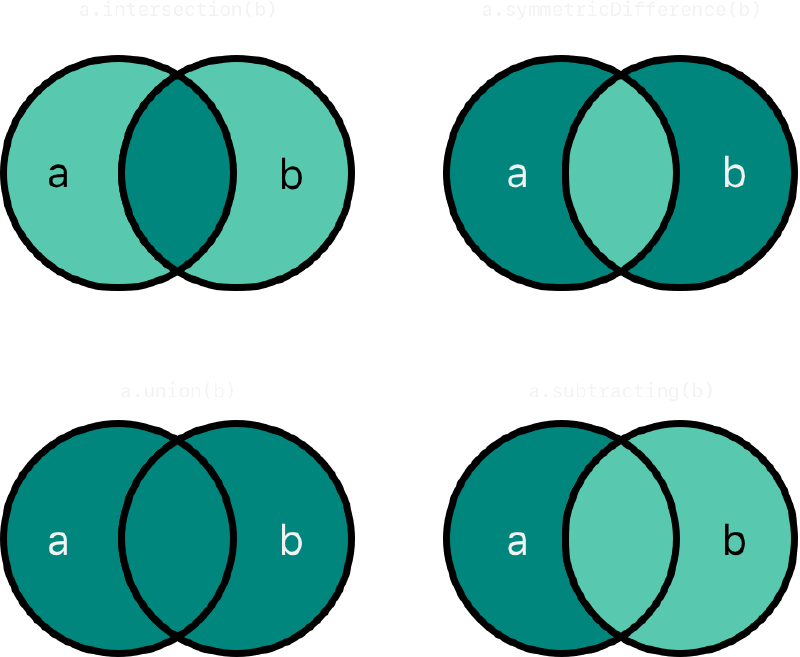
Hashableprotocol to calculate hash values for uniqueness verification. Operations are performed via properties and methods. - Swift provides graphical set operations (see figure below):
intersection(Intersection): Elements present in both. (Top Left)symmetricDifference(Symmetric Difference): Elements in either set, but not both (A ∪ B - A ∩ B). (Top Right)union(Union): All elements from both sets. (Bottom Left)subtracting(Difference): Elements in A but not in B. (Bottom Right)
- A Set is an unordered collection of unique elements. Types stored in a Set must conform to the
- Key Syntax:
Set<Element>,insert(_:),intersection(_:),symmetricDifference(_:),union(_:),subtracting(_:)
2. Swift Example #
let oddDigits: Set<Int> = [1, 3, 5, 7, 9]
let evenDigits: Set<Int> = [0, 2, 4, 6, 8]
let singleDigitPrimeNumbers: Set<Int> = [2, 3, 5, 7]

oddDigits.union(evenDigits).sorted()
// [0, 1, 2, 3, 4, 5, 6, 7, 8, 9]

oddDigits.intersection(evenDigits).sorted()
// []

oddDigits.subtracting(singleDigitPrimeNumbers).sorted()
// [1, 9] (Subtract primes 3, 5, 7 from odd numbers, remaining 1, 9)

oddDigits.symmetricDifference(singleDigitPrimeNumbers).sorted()
// [1, 2, 9] (Union of odds and primes, minus the common 3, 5, 7)Logic:
These methods return a new Set without modifying the original Set. sorted() converts the result into an Array[Element].
3. C# #
Concept Mapping:
C#’s HashSet provides IntersectWith, UnionWith, ExceptWith, and SymmetricExceptWith.
C# Example:
var oddDigits = new HashSet<int> { 1, 3, 5, 7, 9 };
var evenDigits = new HashSet<int> { 0, 2, 4, 6, 8 };

// C# HashSet methods are usually "In-place modification"
var tempSet = new HashSet<int>(oddDigits); // Copy first to avoid modifying original data
tempSet.UnionWith(evenDigits);
// tempSet is now the union result

// To return a new collection like Swift, usually rely on LINQ
var unionResult = oddDigits.Union(evenDigits).ToHashSet();
Key Differences:
- Behavior: Swift methods like
unionandsubtractingare Functional—they return a new collection and do not modify the original. C# methods likeUnionWithare Imperative—they directly modify the collection calling the method. - Syntax Hint: To perform in-place modification in Swift like C#, use methods prefixed with
form, such asformUnionandformIntersection.
Membership and Equality #
1. Core Concepts #
- Concept: Determining relationships between sets.
==: Contents are identical.isSubset(of:): Is a subset (contained by).isSuperset(of:): Is a superset (contains).isStrictSubset(of:)/isStrictSuperset(of:): Strict subset/superset (contained but not equal).isDisjoint(with:): No intersection at all.
- Key Syntax:
isSubset(of:),isSuperset(of:),isDisjoint(with:)
2. Swift Example #
let houseAnimals: Set<String> = ["🐶", "🐱"]
let farmAnimals: Set<String> = ["🐮", "🐔", "🐑", "🐶", "🐱"]
let cityAnimals: Set<String> = ["🐦", "🐭"]

houseAnimals.isSubset(of: farmAnimals) // true
farmAnimals.isSuperset(of: houseAnimals) // true
farmAnimals.isDisjoint(with: cityAnimals) // trueLogic: These methods intuitively correspond to definitions in mathematical set theory. Emojis are valid Character/String types in Swift and can be manipulated directly.
3. C# #
Concept Mapping: SetEquals, IsSubsetOf, IsSupersetOf, Overlaps.
C# Example:
var houseAnimals = new HashSet<string> { "🐶", "🐱" };
var farmAnimals = new HashSet<string> { "🐮", "🐔", "🐑", "🐶", "🐱" };
var cityAnimals = new HashSet<string> { "🐦", "🐭" };

houseAnimals.IsSubsetOf(farmAnimals); // true
farmAnimals.IsSupersetOf(houseAnimals); // true

// C# checks for "overlap" using Overlaps, so "Disjoint" requires negation
!farmAnimals.Overlaps(cityAnimals); // true
Key Differences:
- Syntax: C# does not have a method directly named
IsDisjoint; typically,!Overlapsis used to determine if sets are disjoint. - Behavior: The logical definitions are basically the same. It is worth noting that Swift’s
==operator directly compares content values, whereas C#’sHashSet==operator compares references (Reference Equality) by default. You must use theSetEqualsmethod to compare whether the contents are the same in C#.
Dictionaries #
1. Core Concepts #
- Concept: An unordered collection storing Key-Value pairs. The Key must be
Hashable. - Key Syntax:
[Key: Value],updateValue,removeValue, Subscript key access - Note:
When using Subscript syntax to access a dictionary, it returns an Optional value because the Key might not exist.
2. Swift Example #
var airports: [String: String] = ["YYZ": "Toronto Pearson", "DUB": "Dublin"]

// Add or modify
airports["LHR"] = "London"

// Use updateValue to get the old value
if let oldValue = airports.updateValue("Dublin Airport", forKey: "DUB") {
    print("Old value was \(oldValue)")
}

// Access value (returns Optional)
if let airportName = airports["DUB"] {
    print("Airport is \(airportName)")
} else {
    print("Not found")
}

// Remove
airports["APL"] = nil // Setting to nil removes itLogic:
[Key: Value]is the standard shorthand.updateValueis very useful; it returns the “value before the update” while updating, which is suitable for logging or logic checks.- Setting a Key’s value to
nilis equivalent to deleting that Key from the dictionary.
3. C# #
Concept Mapping: Corresponds to C#’s Dictionary<TKey, TValue>.
C# Example:
// C#
var airports = new Dictionary<string, string> {
    { "YYZ", "Toronto Pearson" },
    { "DUB", "Dublin" }
};

// Access value - C# indexer throws Exception if Key does not exist
// string name = airports["INVALID"]; // Throws KeyNotFoundException

// Safe access method
if (airports.TryGetValue("DUB", out string airportName)) {
    Console.WriteLine($"Airport is {airportName}");
}

// Remove
airports.Remove("APL"); // Cannot assign null to remove
Key Differences:
- Syntax:
- Swift’s subscript access
dict[key]always returns an Optional, forcing developers to handle cases where the Key does not exist (safer). - C#’s indexer access
dict[key]assumes the Key exists; otherwise, it throws an exception. C# developers must get used to usingTryGetValueor Swift’s Optional Binding (if let).
- Swift’s subscript access
- Behavior:
- In Swift,
dict["key"] = nilis a delete operation. - In C#, if the Value Type is a Reference Type,
dict["key"] = nullonly sets the value to null; the Key remains in the dictionary. This is a common point of confusion. - Iteration: When iterating over a dictionary in Swift, you get a Tuple
(key, value), which is very convenient to deconstruct; C# gives aKeyValuePair<TKey, TValue>object, requiring access via.Keyand.Valueproperties.
- In Swift,